Showing posts with label error. Show all posts

Thursday, September 22, 2016

Corrupt Microsoft SQL Database Log in AlwaysOn High Availability Group (AAG)

We recently ran into an issue with one of our environments where the Microsoft SQL Server experienced corruption in the database log. This issue is usually discovered when you attempt to create a new backup and it fails with the message "BACKUP detected corruption in the database log"
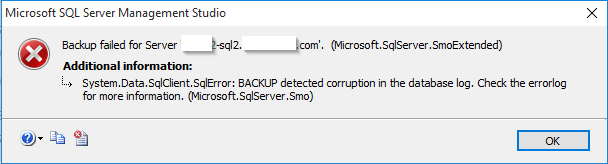

Resolving this issue is normally fairly easy (set the database from a Full Recovery Model to simple and then back again) but it gets a bit more complex when you database is replicated via an AlwaysOn High Availability Group. Here are the steps to fix it (assuming no other databases are in the AAG).

1. Remove Secondary Replica - First we need to stop replication to the secondary replica. To do this we are going to connect to the primary node in our cluster and right click on the SECONDARY replica. Then we select "Remove from Availability Group" and follow the wizard.


2. Remove Database from AAG - Next we need to remove the database from the AAG by right clicking on it under the Availability Databases folder and selecting "Remove Database from Availability Group"

At this point you should have your primary node as the only member of the AAG with no databases associated. At this point you are going to delete the database from the SECONDARY node. Your secondary server should now have no replicas, no availability databases and no database. 

3. Next we need to change the remaining copy of the database on our primary node from Full to a Simple Recovery Model by right clicking on the database and selecting properties > Options.

4. Next we need to do a full backup of the database.
5. Repeat the steps in #3 but in this case change it from simple back to the original Full Recovery Model.
6. Backup the database again.

Now we are ready to re-add the secondary replica

7. On the primary server right click on the Available Replicas folder and select "Add Replica..."
Next you will need to select the "Add Replica" button and will be prompted to connect to your secondary server.

After this you will want to configure your replica. In our case we have selected to have the secondary copy of the database as readable as well as enabling automatic failover.

In the next screen you will need to configure your sync preferences. We are using a Full sync which requires a file share accessible by both SQL Servers. Using this file share SQL will run a backup and place it on the remote share and the secondary node will restore the database from this initial backup. 

Follow the wizard and verify that everything passes

After this you can track the progress of the backup/restore/sync

With that you should have a working AlwaysOn Availability Group again!

Thursday, March 20, 2014

Cloud Content Pack (vCD) for Log Insight

For those of you out there who use VMware vCloud Director and Log Insight you may be interested in a content pack that we have built for use by the OneCloud team to help make our cloud run smoother and to give us a ton of (wait for it) Insight into our environment. It's been a work in progress for about 9 months off and on but has served us very well. I hope that it serves you just as well.

Here are some screenshots:


I hope that this content pack is able to help you better manage your VMware vCloud Director environment. You can download the Content Pack here just be aware that this is not released by VMware and is not supported by them. Like everything else on my blog it just came from a random blogger on the internet :)


Tuesday, February 22, 2011

SQL Management Studio 2005 Express x64 Install Fails

On one of my Windows Server 2008 x64 boxes running SQL 2005 Express I ran into a situation where I needed to install the Management Studio. After downloading and running the installer from Microsoft's site I got the following error:

"This installer has encountered an unexpected error installing this package. This may indicate a problem with the package. The error code is 29506."

I tried re-downloading the package and changing what was getting installed and even modifying the install directory to no avail. Finally I noticed that it was failing on the step "Setting File Security". After noticing that I went and set the UAC to the lowest possible settings and it installed correctly. Looks like the UAC does not like that installer for some reason...

Friday, May 14, 2010

Bad ESX Network Driver on BL490c G6

Ok, so here is the scenario: HP Blade (BL490c G6) has a bad stick of RAM, pull blade from cabinet, swap RAM, re-insert blade, power on blade and receive the following ESX error:

"networking-drivers ...
No compatible network adapter found. Please consult the product's Hardware Compatibility Guide (HCG) for a list of supported adapters."

At first we were sure that the issue was firmware related however it appears that it just might be a bad VMware driver. Here's why: I went ahead and did two test cases to isolate the issue to the VMware driver on our BL490c G6 blades.

Blade 1: Updated to newest Firmware from HP Smart Update Firmware. This updated the NIC Bootcode from 5.0.11 to 5.2.7 but left the iSCSI at 3.1.5. After this the machine will boot most of the time after the blade is removed from the chassis, however after several reboots there are seemingly random times when ESX will not load the NIC and you get the "No compatible network adapter found" error when attempting to boot ESX. After installing the new drivers found at "http://www.vmware.com/support/vsphere4/doc/drivercd/esx40-net-bnx2x_400.1.48.107-1.0.4.html" using the esxupdate command it works fine. I have rebooted many times and removed the blade and am no longer able to get the error.

Blade 2: I left the firmware alone and just updated the VMware driver to the latest from the above URL. After several reboots and physically removing the blade from the cabinet twice I am unable to get the error.

Conclusion: Looks like a VMware driver issue; however updating the HP Firmware on the NIC from 5.0.11 to 5.2.7 does seem to help the issue taking it from happening every time to approximatly %50 of the time.