Tuesday, August 9, 2011

Unable to run Installer on Windows Server

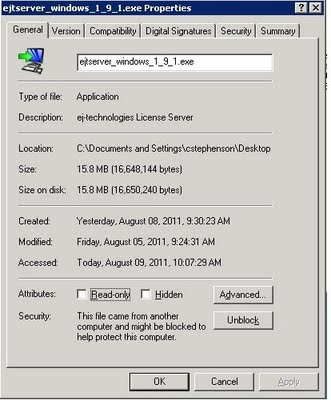
If you ever run an installer and get the following message "Windows cannot access the specified device, path, or file. You may not have the appropiate permission to access the item" try the below. Note: I am assuming that you already have rights...


1. Copy the file to your local machine

2. Right click on the file and go to Properties.

3. Down at the bottom of the General tab you might see a Security option that says "This file came from another computer and might be blocked to help protect this computer."

4. Click Unblock.


Thursday, August 4, 2011

Creating Windows Event Log Events

We use VMware vCenter Configuration Manager at our site to monitor our Windows servers for signs of future problems by searching the Windows Event Logs for a predefined list of events. Every once in a while (especially after a while without alerts) you want to test and make sure that everything is indeed being monitored properly. To do this I needed to inject an event into the Event Log and see if we received an alert in VCM. The question was this: how do I impersonate an existing service? The built in eventcreate.exe will not let you add events for a source that already exists, which is exactly what I want to do... Ah, I love it when people have already coded an application to do something that I need to do and save me from having to write it myself.

Meet eventcreate2.exe: http://code.google.com/p/eventcreate2/

Eventcreate2.exe has one flaw, you cannot specify a remote machine; as opposed to the built in eventcreate.exe which does let you specify remote machines. Other than that it is awesome. Using a command like the below I was able to successfully inject events impersonating an existing service and verify that our alerting was indeed working as advertised.

eventcreate2.exe /L Application /T Warning /SO dmboot /ID 2 /D "This is a test Windows RAID Failure Alert"

Monday, August 1, 2011

VMware VDR Service Did not Start Up

I recently ran into an issue after replacing my VDR (now VCDR) Appliance from version 1.2 to 2.0 and ran into a very misleading error that can cause confusion. A week after installing the VCDR Appliance I tried to connect to it using the vSphere Client on my laptop and was greeted with the following error: "Error: The Data Recovery service did not start up. If the problem persists, please restart or redeploy the Data Recovery appliance."
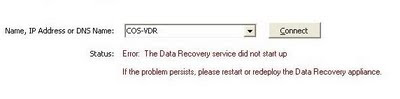


Restarting the appliance does not change the error message and I was worried it was dead but thankfully after doing some digging in the log files I discovered a very interesting error: "UnixResponder: Respond: Rejecting non-SSL connection from client 10.25.43.72 (socket 40)".


Turns out the problem was something really quite simple. The reason for this behavior was I had the 1.2 version of the VDR Plugin installed on my laptop. Apparently it can sort of talk to the new version 2.0 appliance but not enough to work. All you need to do is uninstall the old 1.2 version of the VDR plugin via Add and Remove Programs and install the new version 2.0 plugin.
Thursday, March 24, 2011

Problem with MacBook Pro and Seagate Momentus XT Hybrid Drive

I just tried to drop a mac image onto a brand new Seagate Momentus XT hybrid drive using a process that has worked on other drives hundreds of times. This time however I ran into issues. After using the Restore feature and rebooting I got the dreaded blinking folder with a question mark. I tried 2 different MBP's as well as 2 different drives, same issue. Tried scanning and repairing the drive to no avail. Finally I dropped in the original Mac OS X DVD and tried to load it manually. When I did that I ran into a nice little error of "Mac OS X Cannot Start Up From This Disk". No additional information, gee thanks. Doing a bit of googling I ran across an article from Apple saying that this error is caused by a partitioning problem. The drive check reported that it was a-ok but at this point I was willing to give it a shot. So, I went back into the mac tools, deleted all partitions on the Seagate drive and created 1 new partition at 495GB. Then I attempted the restore to that partition I had manually created and it worked. I don't know what it is about these drives but it was the same issue for both and I have never seen that issue on other drives. After that however it seems to be working great.

Wednesday, March 2, 2011

Unable to Disable Bluetooth Radio

I ran into an interesting issue yesterday where a user needed to disable his bluetooth radio on a bootcamped Apple MacBookPro but the disable option was greyed out in Mac OS X and under the device manager in Windows it was missing. The easy answer is that you cannot disable the radio if you have devices bound to it. Delete any existing device bindings and then you can disable the radio.

Tuesday, February 22, 2011

SQL Management Studio 2005 Express x64 Install Fails

On one of my Windows Server 2008 x64 boxes running SQL 2005 Express I ran into a situation where I needed to install the Management Studio. After downloading and running the installer from Microsoft's site I got the following error:

"This installer has encountered an unexpected error installing this package. This may indicate a problem with the package. The error code is 29506."

I tried re-downloading the package and changing what was getting installed and even modifying the install directory to no avail. Finally I noticed that it was failing on the step "Setting File Security". After noticing that I went and set the UAC to the lowest possible settings and it installed correctly. Looks like the UAC does not like that installer for some reason...

Friday, February 18, 2011

XP Make Available Offline Fails with Access is Denied

If you have permissions to the folders and files you probably need to give the user read access to the root directory of the share. Example:

\\server1.walker.dps\shares$\myshare

User will need Read permissions to the shares$ share. You can set it to Read and that folder only for security purposes.